How to Use SeeMeCook Cooking Mode
Open a saved recipe in SeeMeCook and start Cooking Mode to follow it one step at a time. The screen stays awake, instructions appear in large type and spoken narration can read the steps aloud. Each step shows the ingredients you need at that point.
What you see in Cooking Mode
Cooking Mode provides these controls for the recipe you opened:
- One step at a time. The screen shows the step you're on and nothing else. Not the headnote, not step nine, not a comment section. When you move on, the next step takes over the screen.
- Big type. Readable from the counter while your hands are in the bowl — no picking the phone up, no squinting.
- The screen stays awake. For the whole cook. The knuckle-tap wake-up ritual is gone.
- Steps can be spoken. Narration reads the current step aloud, which is exactly what you want while your eyes are on a pan that's one shade away from too far.
- Per-step ingredient callouts. Each step shows what you need for that step, with the amounts — so "add the sauce ingredients" comes with the actual list, and you're never scrolling back to the top mid-sauté to check how much soy sauce.
None of these is exotic on its own. Together they remove basically every reason you currently swear at your phone while cooking.
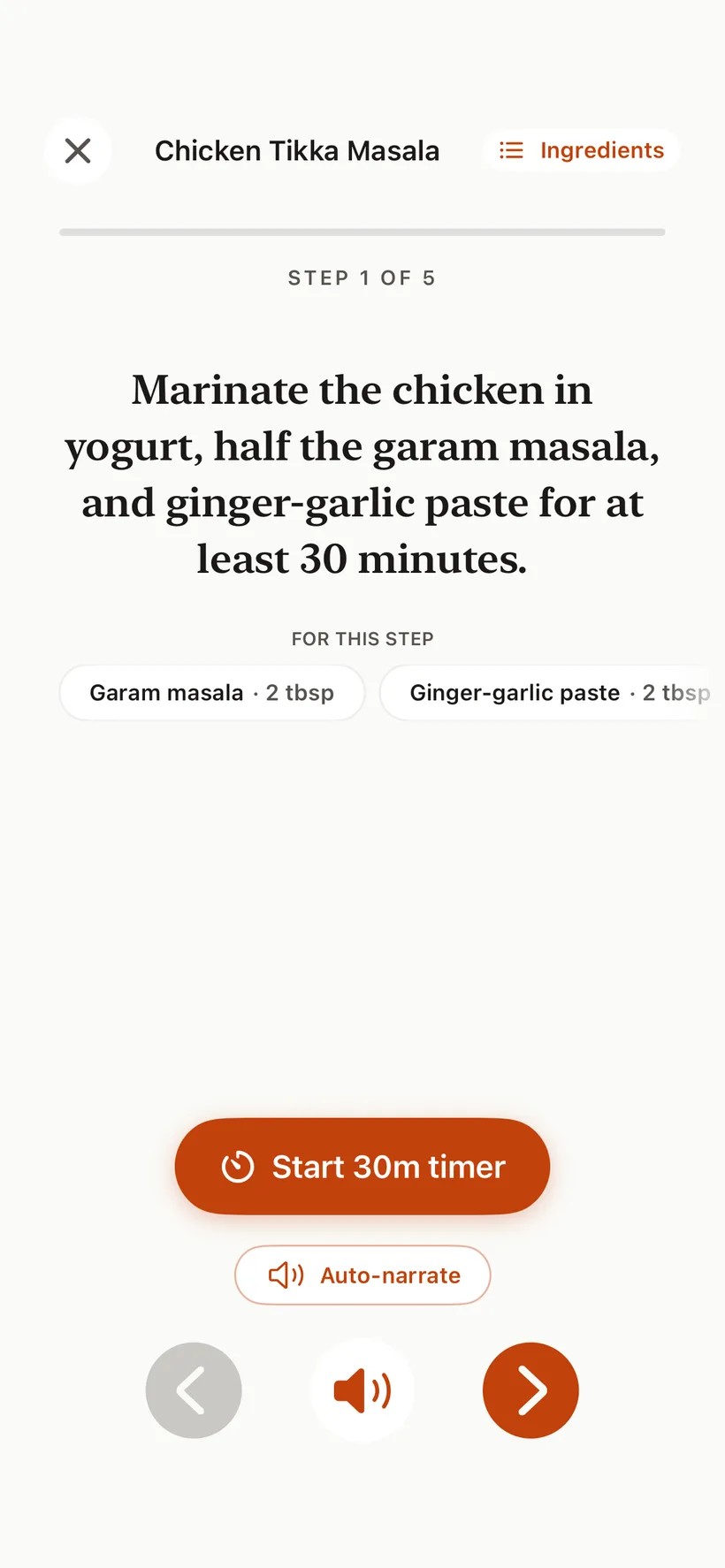
How to cook hands-free, step by step
- Get the recipe into SeeMeCook. Share a supported TikTok, Reel, or YouTube video from its app, paste a supported recipe link, photograph a cookbook page or handwritten card, or upload a video. Here's the share-sheet walkthrough if you're new to it.
- Read the recipe once, like you would a cookbook page. Get your ingredients out.
- Start Cooking Mode.
- Cook the step in front of you. The screen stays awake, the step is in big type, and the ingredients for that step are right there with their amounts.
- Move through the recipe one step at a time, letting the narration read steps aloud whenever your hands and eyes are busy.
That's it. The phone stops being a thing you manage and becomes a thing you glance at.
Why one step at a time matters more than it sounds
Recipes rarely fail at the shopping stage. They fail at the stove, in the two minutes when three things need attention at once and you look away from the pan to parse a wall of text.
Showing one step in big type isn't a cosmetic choice — it's about how much you have to hold in your head. When the onions are browning, the only relevant information in the universe is the current step and its ingredients. Everything else on a normal recipe page is, at that moment, noise.
The per-step callouts quietly fix a second failure, too: discovering mid-step that "the sauce" you're meant to pour in is four ingredients you haven't measured. When each step announces what it needs, the surprise ingredient ambush mostly stops happening.
It works on recipes from anywhere
Cooking Mode isn't tied to one kind of recipe. Anything in your SeeMeCook library works: a recipe pulled out of a TikTok, an imported blog link, a photographed page from the cookbook you actually own, a handwritten card from your grandmother. Once it's a structured recipe — ingredients with quantities, numbered steps — it cooks the same way.
Which is the quiet point of the whole thing. The hard part of cooking from the internet was never finding recipes. It was the last meter, between the counter and the screen.
FAQ
Does the screen really stay on the whole time?
Yes. In Cooking Mode the screen stays awake for the duration of the cook, so the recipe is still there when you look up from the pan — no tapping, no re-unlocking, no scrolling back to where you were.
Can it read the steps out loud?
Yes. Step narration speaks the current step, which is the closest thing to having someone in the kitchen reading the recipe over your shoulder — useful when your eyes need to stay on the food.
Do I still see amounts while I'm cooking?
Yes, and you see them at the right moment. Each step calls out the ingredients that step needs, with their quantities, so you're not holding the whole ingredient list in your head or scrolling back to it.
Which recipes work with Cooking Mode?
Recipes stored in your library work with Cooking Mode, whether they arrived from a supported TikTok, Instagram, or YouTube link, a supported recipe page, a cookbook photo, a handwritten card, or a video upload. SeeMeCook is free to start on iPhone and Android, with 10 recipe imports every week.
Save a recipe you want to cook
Import a supported video, link or cookbook photo. Review the recipe and open Cooking Mode. Free to start.
Get SeeMeCook free